Protecting Worker Privacy in Camera-Based Process Monitoring
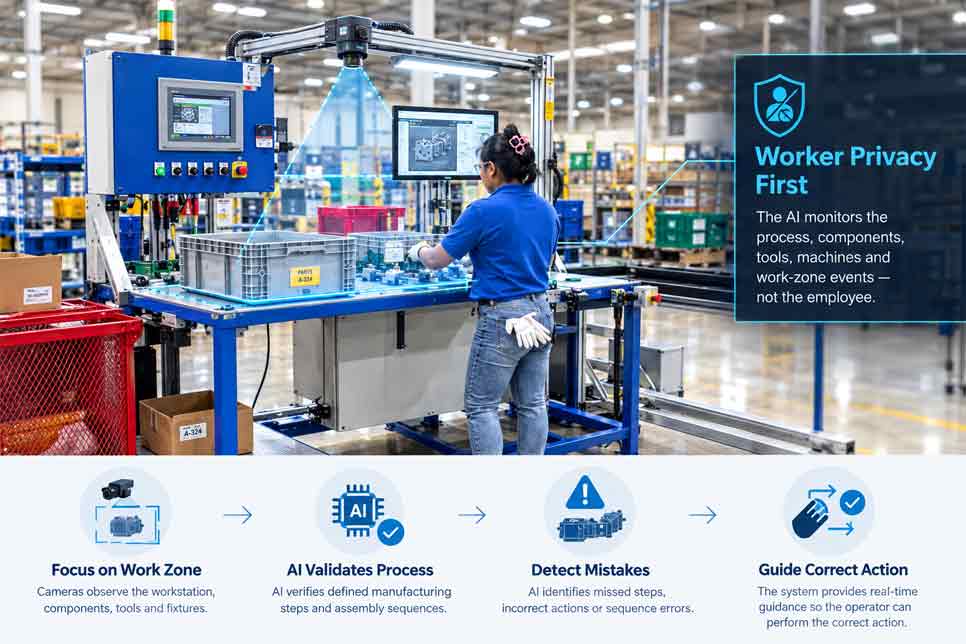
Camera-based process monitoring can help manufacturers detect missed steps, validate assembly sequences, improve safety, and guide operators through complex tasks. However, introducing cameras into a workplace also creates important questions about privacy, transparency, data access, and responsible use.
Intelgic’s Certainty platform is designed and developed for industrial process monitoring and real-time operator guidance. Its state-of-the-art AI is trained using representative shop-floor data to create process intelligence for each manufacturing operation.
During process execution, a Certainty AI agent follows and validates the defined steps. When it detects a mistake, missed step, or incorrect sequence, it not only flags the issue but also guides the operator to perform the correct action at the appropriate time.
The purpose of the system is to understand and improve the manufacturing process—not to conduct unnecessary surveillance of employees.
A responsible implementation focuses cameras and AI on components, tools, machines, fixtures, work zones, and process events while minimizing the collection and retention of personal information.
Why Privacy Matters in Camera-Based Monitoring
Unlike a conventional presence sensor, an industrial camera may capture detailed information about a workstation and the people working within it.
Depending on its position and configuration, a camera could record:
Some of this information may not be required to validate the manufacturing operation. Collecting unnecessary data creates avoidable privacy, security, and employee-relations risks.
Privacy protection should therefore be part of the system design from the beginning rather than an adjustment made after cameras have been installed.
Process Monitoring Is Not the Same as Worker Surveillance
Camera-based process monitoring should have a clearly defined manufacturing purpose.
Appropriate objectives may include:
The system usually does not need to identify a worker’s face or evaluate unrelated behavior to achieve these objectives.
For example, AI may need to determine that a hand picked a component from a defined bin. It does not necessarily need to know whose hand it was.
Similarly, it may need to confirm that a tool entered a fastening zone without evaluating the operator’s facial expressions or activities elsewhere in the workstation.
Privacy by Design
Privacy by design means building privacy controls into the camera system, AI workflow, software architecture, and operating procedures.
A privacy-focused implementation should follow several principles:
These measures can help manufacturers obtain the operational benefits of Visual AI without collecting more worker information than necessary.
Define the Purpose Before Installing Cameras
Every camera should have a documented purpose.
Before selecting camera locations, the project team should determine:
A camera installed to confirm component placement should not automatically become a general-purpose employee-monitoring camera.
If the business purpose changes, the privacy assessment and system configuration should also be reviewed.
Focus Cameras on the Process
One of the most effective privacy measures is to limit the camera’s field of view.
- ✓Components
- ✓Assembly fixtures
- ✓Tooling
- ✓Product surfaces
- ✓Defined hand-work areas
- ✓Component bins
- ✓Machine interfaces
- ✓Material-flow zones
- ✓Inspection points
- ✓Safety-critical process areas
- ✕Faces
- ✕Break areas
- ✕Personal workspaces
- ✕Computer screens unrelated to production
- ✕Walkways outside the process
- ✕Neighboring workstations
- ✕Restrooms and changing areas
- ✕Other areas where monitoring is unnecessary or inappropriate
The camera angle, lens, working distance, resolution, and region of interest should be selected for the manufacturing task rather than for broad observation of the worker.
Use Digital Privacy Zones
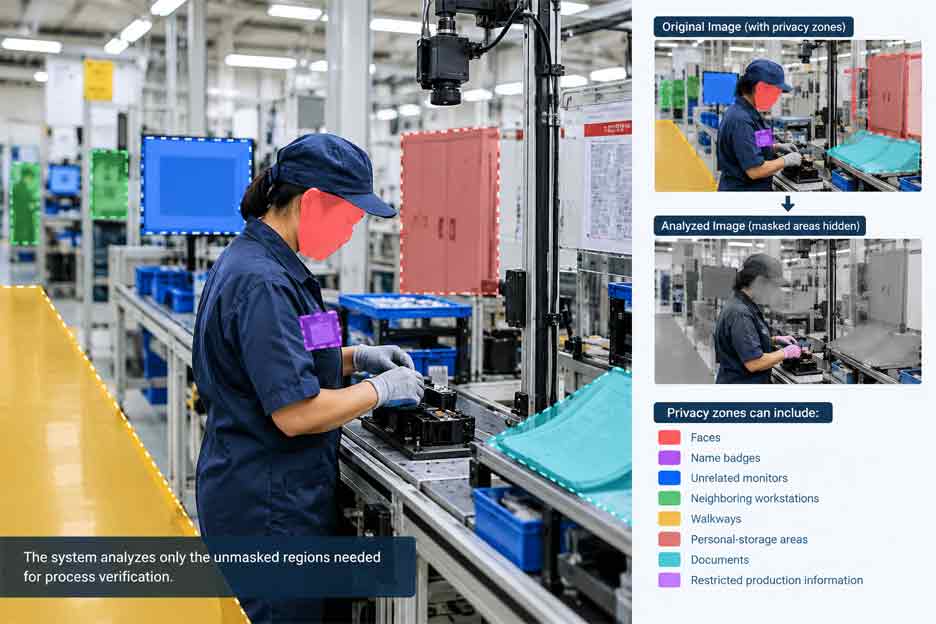
Physical camera placement may not always be enough to exclude every irrelevant area. Digital privacy zones can mask selected parts of an image before it is analyzed, displayed, or stored.
Privacy masks may be applied to:
The system can analyze only the unmasked regions needed for process verification.
Where practical, masking should occur as early as possible in the data pipeline so that unnecessary information is not retained in raw images.
Avoid Facial Recognition Unless It Is Necessary
Most process-monitoring applications do not require facial recognition.
- ✓Objects
- ✓Tools
- ✓Components
- ✓Hands
- ✓Product states
- ✓Process zones
- ✓Assembly actions
- ✓Step sequences
- ✕Badge scanning
- ✕RFID identification
- ✕Workstation login
- ✕MES assignment
- ✕Operator-selected work order
- ✕Tool authentication
If operator identification is required for traceability, the less intrusive methods listed above may be available.
Any use of biometric identification requires careful review of the applicable laws, workplace policies, contractual obligations, and business necessity.
Minimize the Data Collected
Data minimization means collecting only the information required for the defined process objective.
A manufacturing process may not require continuous video storage. Depending on the application, Certainty can be configured around data such as:
For a successfully completed process, the manufacturer may choose to retain only the event record and essential traceability information. Images or short video clips may be stored only when an error, exception, or review condition occurs.
The appropriate approach depends on quality requirements, traceability needs, cybersecurity policies, and applicable workplace and privacy rules.
Process Data at the Edge
Edge processing means analyzing images close to the workstation rather than continuously sending raw video to a remote system.
Potential privacy and security benefits include:
Certainty can be deployed within an architecture selected for the manufacturer’s operational, cybersecurity, and data-governance requirements.
An on-premises, edge, cloud, or hybrid configuration can be evaluated based on the application.
Separate Real-Time Analysis from Data Retention
A camera may need to observe an action in real time, but that does not automatically mean the full video must be stored.
These are separate decisions:
For example, the AI may analyze a continuous video stream to detect assembly events while retaining only:
This approach can preserve useful production evidence while reducing unnecessary collection of worker data.
Establish Clear Retention Rules
Manufacturers should define how long each category of information will be retained.
Different retention periods may be appropriate for:
Data should not be retained indefinitely without a defined purpose.
Automated retention rules can delete or archive information after the approved period. Legal holds, investigations, customer requirements, or regulated quality records may require exceptions, but those exceptions should be documented and controlled.
Limit Access to Images and Video
Not everyone who can view production results should automatically have access to raw images or video.
Role-based access may separate permissions for:
| Role | Example access |
|---|---|
| Operator | Only the current instruction and detected error |
| Quality engineer | The annotated product image |
| Specifically authorized personnel | Complete video records |
Maintain Audit Trails
The system should record significant data-access activities.
An audit trail may include:
Audit trails support accountability and help manufacturers investigate unauthorized access or inappropriate use.
Protect Data in Storage and Transit
Camera data should be treated as sensitive operational information.
Security controls may include:
Cybersecurity is particularly important when camera data contains proprietary manufacturing processes, product designs, customer information, or identifiable worker activity.
Use Real-Time Guidance Without Unnecessary Identification
Certainty can guide an operator without creating a detailed personal profile.
When the AI detects an error, the system can display instructions such as:
The instruction is based on the process state and detected error—not necessarily on the identity of the person performing the task.
This keeps the system focused on completing the manufacturing operation correctly.
Use Shop-Floor Data Responsibly for AI Training
Intelgic’s state-of-the-art AI can be trained using representative shop-floor data to create process intelligence. That training data should be governed carefully.
Before shop-floor images or video are used for model development, manufacturers should consider:
Training datasets can often be reduced to cropped images of tools, components, hands, fixtures, and process regions rather than storing the complete workstation view.
Separate Product Quality from Employee Evaluation
Process-monitoring data may reveal that errors occur more frequently during certain shifts, at particular stations, or during specific operations. This information can help improve work instructions, station design, training, tooling, and material presentation.
However, process data should not automatically be interpreted as an individual performance assessment.
An error may be influenced by:
Analytics should be used to understand the complete production system. Any use of monitoring data for individual employment decisions requires appropriate policies, human review, and compliance with applicable requirements.
Operator Transparency and Communication
Workers should understand why cameras are present and how the information is used.
Clear communication should explain:
Visible signage, training, written policies, demonstrations, and consultation with relevant worker representatives can support transparency.
A system is more likely to be accepted when operators understand that it helps them perform the process correctly and prevents mistakes from progressing downstream.
Human Review of Important Decisions
AI can make mistakes, especially when an image is obstructed, lighting changes, a new component appears, or the production condition falls outside the validated range.
Certainty can use a pass, fail, or review workflow. A review result allows an authorized person to evaluate uncertain evidence before a significant decision is made.
Human review is particularly important when:
The system should not treat missing or invalid visual evidence as proof that an operator made an error.
Image-Quality and Visibility Checks
Before evaluating a process step, Certainty can verify that the image is suitable for analysis.
The system may check whether the image is:
If the view is blocked by a person, tool, robot, or material, the system can wait for a clear image, use another camera, request a repeat observation, or generate a review-required result.
This helps separate actual process errors from camera or visibility problems.
Privacy-Preserving System Architecture
A privacy-conscious camera-based monitoring system may include:
The final architecture should reflect the manufacturing objective, applicable requirements, customer policies, and the sensitivity of the process data.
Certainty AI Platform
Certainty acts as the central process-monitoring, operator-guidance, and data-management platform.
It can manage:
Privacy controls can be incorporated into the way cameras are positioned, images are processed, results are stored, and users access the system.
Integration with Existing Manufacturing Systems
Certainty can be integrated with factory automation and manufacturing software.
PLC integration
The platform can exchange:
MES integration
MES connectivity can support:
The integration can be designed so manufacturing systems receive only the process information they require rather than unrestricted access to raw camera data.
Privacy in Cloud-Based Process Analytics
- ✓Missed steps
- ✓Incorrect sequences
- ✓Process errors
- ✓Cycle time
- ✓Rework
- ✓Station performance
- ✓Production trends
- ✓Recurring process problems
- ✕Aggregated results
- ✕De-identified records
- ✕Process-level statistics
- ✕Cropped product images
- ✕Masked images
- ✕Event metadata
- ✕Restricted image access
Where cloud storage is not permitted, sensitive images can remain on-premises while approved statistics are shared with the cloud platform.
Conduct a Privacy Impact Assessment
Before deployment, manufacturers should evaluate the privacy risks created by the proposed system.
A privacy impact assessment may consider:
Requirements vary by country, state, industry, workplace agreement, and intended use. Manufacturers should involve their legal, privacy, cybersecurity, human-resources, quality, and worker-relations teams where appropriate.
Questions to Ask Before Deployment
Manufacturers planning a camera-based process-monitoring system should ask:
The answers should be documented before the system is placed into production.
Responsible Camera-Based Process Monitoring from Intelgic
Intelgic’s Certainty platform uses camera-based AI to monitor industrial processes, validate manufacturing steps, and guide operators at the correct time.
A responsible deployment focuses on the operation rather than unnecessary observation of the individual. Camera placement, privacy zones, local processing, data minimization, limited retention, access controls, audit trails, and transparent workplace policies can protect worker privacy while maintaining effective process verification.
When a mistake occurs, Certainty can guide the operator toward the correct action. When the visual evidence is incomplete or uncertain, the system can request a review instead of making an unsupported decision.
Looking to implement privacy-conscious, camera-based process monitoring? Contact Intelgic to discuss an industrial AI and operator-guidance system powered by the Certainty platform.
Frequently Asked Questions
Does camera-based process monitoring require facial recognition? +
No. Most process-monitoring applications can focus on components, tools, hands, fixtures, and defined work zones without identifying an operator’s face.
Does Certainty need to store continuous video? +
Not necessarily. Depending on the application, the platform can be configured to retain process events, selected images, error records, or short video segments rather than complete production video.
Can camera data be processed inside the factory? +
Yes. Edge or on-premises processing can keep raw images within the manufacturing facility while sending only approved results or aggregated statistics to other systems.
Can faces and unrelated areas be hidden? +
Yes. Camera positioning, image cropping, and digital privacy masks can be used to exclude or obscure faces, neighboring workstations, screens, walkways, and other unnecessary areas.
Should audio be recorded with process-monitoring video? +
Audio should remain disabled unless it is required for a clearly defined and properly authorized manufacturing purpose. Most visual process-verification applications do not need audio.
Who should have access to recorded images? +
Access should be limited according to job responsibilities. Operators, quality engineers, system administrators, and other users can be given different levels of access.
Can monitoring data be used to evaluate employee performance? +
The system is designed to validate industrial processes and guide operators. Any use of the data for individual employment decisions requires separate policies, appropriate human review, and compliance with applicable workplace and privacy requirements.
What happens when the camera cannot see a required action? +
Certainty can wait for a clear view, use another camera, request image reacquisition, combine visual evidence with process signals, or return a review-required result.
Can worker information be removed from AI training data? +
Depending on the application, training data can be cropped, masked, blurred, de-identified, or limited to the relevant tools, components, hands, and process regions.
Can Certainty integrate with an existing PLC and MES without sharing raw video? +
Yes. Certainty can exchange product identity, process status, errors, results, and traceability information while raw images remain within a controlled local environment.