Capability 001
Trained on Your SOPs
The AI Agent learns each instruction, sequence, tool, part, tolerance, safety requirement, and expected result.
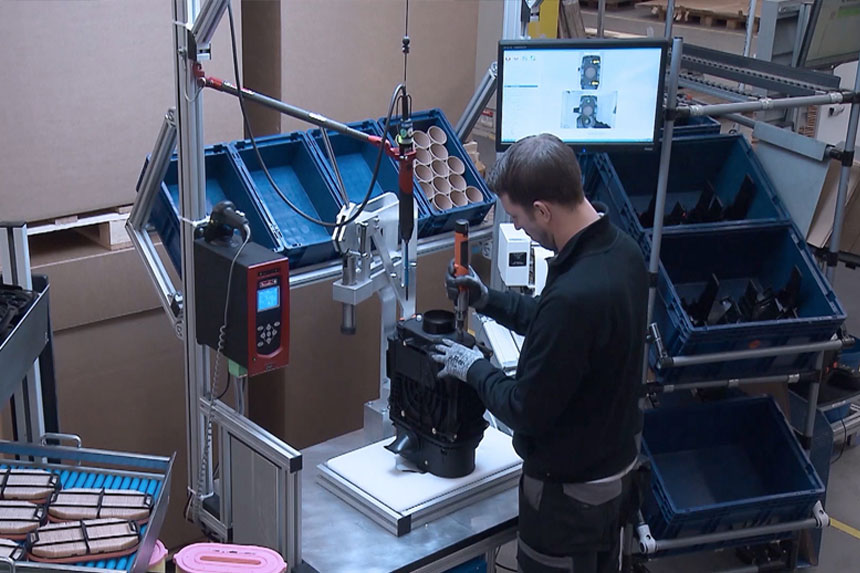
Intelgic Operator Guidance AI works alongside manufacturing operators as an always-available assistant.
Trained on your SOPs, work instructions, products, tools, machines, and process sequences, it sees through cameras and understands how each operation should be performed.
Detect. Guide. Correct. Verify.
The AI Agent does not just flag errors - it shows operators how to correct them and verifies the result.
















Manufacturing operators perform complex work involving multiple parts, tools, machines, product variants, and quality requirements.
Printed SOPs, checklists, and instruction screens provide information, but they cannot see what is happening or respond to the operator's actions.
Intelgic Operator Guidance AI turns passive instructions into active, real-time assistance.
The AI Agent sees the live operation through cameras, recognizes the active process step, and guides the operator according to the approved work instruction.
The AI Agent learns each instruction, sequence, tool, part, tolerance, safety requirement, and expected result.
It recognizes the active product, process step, operator action, machine state, tools, and components.
The AI Agent delivers the instruction needed for the current operation - not a generic checklist or an entire manual.
After the operator performs the required action, the AI Agent confirms that the instruction and expected result were completed correctly.
Operators are expected to remember and correctly execute increasingly complex processes across multiple products and variants.
Even experienced operators can encounter uncertainty when processes change, production mixes increase, or uncommon situations occur.
Printed documents, videos, and screens cannot determine whether the operator is following the instruction correctly.
Long SOPs force operators to search for the correct instruction while production is running.
Supervisors and experienced workers cannot remain beside every operator at every station.
A missed step or incorrect action may not be discovered until downstream inspection, final assembly, or customer use.
Different products may require different parts, tools, sequences, settings, and quality checks at the same station.
Critical knowledge often remains with experienced operators instead of being captured in a scalable system.
Operator Guidance AI follows the live operation and provides assistance according to what is happening at the station.
It can communicate through station displays, visual overlays, lights, audio prompts, tablets, smart screens, or connected interfaces.
Display the exact action required for the active product and process step.
Show the operator which component or product variant must be selected.
Verify that the appropriate tool, fixture, fastener, or machine is being used.
Help the operator place, align, orient, or connect components correctly.
Ensure every operation is completed in the approved order.
Check that the completed action produced the expected result before allowing the process to continue.
Traditional systems notify the operator that something is wrong. Intelgic Operator Guidance AI helps resolve the problem.
The AI Agent identifies a missed, incorrect, incomplete, or out-of-sequence action.
It shows which work instruction was affected and why the current action is incorrect.
The AI Agent presents the correct part, tool, position, sequence, or corrective action.
The operator performs the correction with real-time AI assistance.
The AI Agent checks the operation again and confirms that the result meets the approved instruction.
The original deviation, guidance, correction, verification, and final result are recorded.
Intelgic maps each instruction, sequence, product variant, machine, tool, part, quality check, and expected outcome.
The AI Agent is trained using your actual station, products, processes, tools, operators, and approved methods.
Industrial cameras observe the process. The system can also connect with PLCs, machines, sensors, MES, ERP, and other factory platforms.
The AI Agent recognizes the active instruction and provides timely, station-specific assistance.
Every completed step, deviation, correction, and result becomes structured data for traceability and improvement.
Present every instruction sequentially and verify completion before moving forward.
Best for: new operators, complex assembly, training, and regulated processes.
Allow experienced operators to request help only when additional information is required.
Best for: skilled operators and processes with occasional complexity.
Monitor silently and intervene only when an error, deviation, or abnormal condition is detected.
Best for: experienced teams and stable production processes.
Automatically load the correct instructions, components, tools, and sequence for the active product variant.
Best for: high-mix manufacturing and frequent product changeovers.
Explain detected errors and guide the operator through the approved correction.
Best for: error prevention, rework reduction, and first-time-right production.
Provide additional explanations, visual examples, and confirmation during operator onboarding.
Best for: new employees, transferred workers, and process updates.
Guide component selection, positioning, fastening, wiring, connecting, and final assembly verification.
Support drilling, welding, stitching, stamping, surface mounting, molding, CNC machining, wiring, cutting, joining, and other daily operations.
Verify the correct product, machine, fixture, position, orientation, and loading sequence.
Confirm the correct tool, screw, fastener, attachment method, and operation sequence.
Guide tooling changes, fixture setup, machine preparation, recipe selection, and first-product verification.
Assist technicians through inspection, cleaning, replacement, setup, and preventive-maintenance procedures.
Verify product quantities, accessories, documents, labels, packaging materials, and packing sequence.
Guide visual inspection, measurement, defect review, acceptance decisions, and corrective action.
Verify final assembly, configuration, labeling, packaging, documentation, and shipment readiness.
Traditional training often occurs away from the production process. Operators must later remember and apply what they learned.
Operator Guidance AI provides training while the work is being performed.
It allows operators to learn the actual process using real products, tools, machines, and station conditions - with AI assistance available at every step.
Help new operators begin productive work with real-time station assistance.
Deliver the same approved process knowledge across trainers, shifts, lines, and facilities.
Allow operators to learn by performing the process with immediate guidance and verification.
Operators do not need to memorize every instruction, variant, tool, or exceptional condition.
Immediately deliver updated guidance when SOPs, products, tools, or requirements change.
Use guidance requests, repeated corrections, and difficult instructions to identify where additional training is required.
Operators bring experience, judgment, adaptability, and practical manufacturing knowledge.
Intelgic Operator Guidance AI strengthens those capabilities by providing continuous observation, instant access to instructions, and real-time corrective assistance.
It does not replace the operator. It gives every operator access to the process knowledge and support normally available only from the most experienced people on the shop floor.
Every guidance event creates valuable process data.
Intelgic converts this previously invisible information into insights that improve work instructions, operator training, station design, tooling, and production performance.
Identify which work instructions require the most operator assistance.
Discover recurring mistakes, difficult actions, and unclear instructions.
Measure how quickly operators respond to guidance and complete corrective actions.
Understand which variants require more assistance, time, or corrections.
Measure how long each step takes and identify specific bottlenecks.
Track whether guidance requirements and correction events decrease over time.
Operator Guidance AI connects every assisted station to one centralized dashboard.
Production, quality, engineering, and training teams can review:
Detect missed steps, wrong parts, incorrect tools, and improper sequences before they create defects.
Guide corrections at the station and verify the result before the product moves downstream.
Provide new operators with continuous assistance while they perform actual production work.
Correct mistakes earlier, while the product is still at the station.
Deliver the same approved guidance across operators, shifts, lines, and facilities.
Give every operator immediate access to the correct instruction and corrective support.
Convert experienced-worker knowledge and approved practices into scalable AI guidance.
Use guidance and correction data to improve SOPs, training, tooling, station design, and process planning.
Intelgic Operator Guidance AI can be deployed without replacing your existing machines or production systems.
We study the work instructions, product flow, tools, machines, operator actions, recurring errors, and desired outcomes.
Intelgic designs the camera placement, AI models, station interface, guidance method, and factory-system integration.
The AI Agent is trained and validated using your actual processes, products, operators, tools, and work instructions.
The system is integrated with station displays, cameras, PLCs, machines, sensors, MES, and other interfaces.
Guidance events and process data are used to improve AI performance, work instructions, training, and operations.
Every AI Agent is trained on your work instructions, products, tools, machines, process sequence, and quality requirements.
Industrial cameras allow the AI Agent to understand what is actually happening at the station.
The AI Agent explains errors, provides corrective guidance, and verifies the completed result.
The solution is engineered around your current stations, tools, machines, operators, and factory systems.
Every guidance event becomes structured data for process analysis, operator training, and continuous improvement.
Intelgic supports assessment, system design, AI training, deployment, integration, operator onboarding, and ongoing optimization.
Share your SOPs, work instructions, station details, recurring errors, and operator-training objectives.
Intelgic will design an Operator Guidance AI Agent that monitors every step, provides real-time assistance, guides corrections, and verifies the completed work.
©2026 Intelgic Inc. All Rights Reserved.