How to Prevent Human Errors on the Manufacturing Shop Floor
Human errors on the shop floor are rarely caused by a lack of care. They usually emerge from complex processes, unclear instructions, similar-looking components, production pressure, repetitive work, frequent product changes, missing materials, and insufficient training.
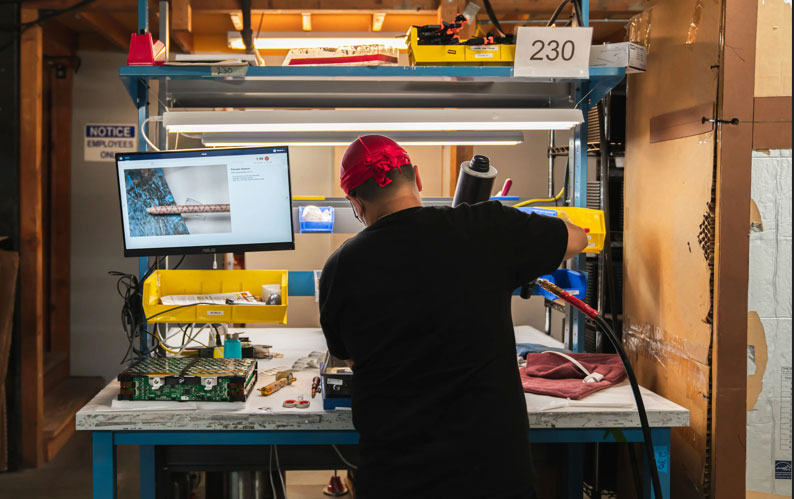
Traditional quality systems often discover these mistakes only after a process is completed. By that point, the product may already require rework, rejection, or disassembly.
A more effective approach is to prevent errors at the point of execution.
Intelgic uses industrial cameras, AI Assistants, digital work instructions, and manufacturing-system integration to observe work in real time. The AI understands operator actions, compares them with approved SOPs, and provides immediate guidance when a step is missed, performed incorrectly, or completed out of sequence.
This turns quality control from a final checkpoint into continuous process assistance.
What Is a Human Error in Manufacturing?
A human error is an unintended action or omission that causes the actual process to differ from the approved manufacturing method.
Examples include:
An effective prevention strategy must identify both the error and the conditions that made it possible.
Why Human Errors Occur on the Shop Floor
Human error is often a symptom of a wider process problem.
Operators may need to remember dozens of steps, components, and quality checks. Static documents can be difficult to consult during active production.
Two components may differ only by a hole, slot, color, orientation, connector, or small dimensional feature.
Frequent changes between models and variants increase the number of component combinations and process sequences an operator must remember.
Highly repetitive tasks can reduce attention and make a missed action difficult to notice.
When cycle-time targets are demanding, operators may rush, develop shortcuts, or advance before confirming completion.
New operators may understand the general process but lack experience with unusual variants, difficult steps, or recovery procedures.
The most valuable process knowledge often remains with a small number of experienced operators, supervisors, and quality personnel.
Incorrectly labeled bins, similar components stored close together, and unavailable materials can create picking mistakes and delays.
Poor tool placement, difficult reaching, inadequate lighting, and obstructed visibility can increase error probability.
The work order may change in MES, but the correct information may not reach the operator clearly or immediately.
Different shifts or operators may develop different ways of performing the same process. Some variations can affect quality or efficiency.
Preventing human errors requires more than telling operators to be careful. It requires a system that makes the correct action clear, verifies execution, and provides help immediately.
A Layered Strategy for Preventing Human Errors
A robust error-prevention program uses several connected layers.
Intelgic's AI Assistants strengthen the guidance, verification, prevention, and learning layers.
Move Quality Control to the Point of Execution
Final inspection can still provide an additional quality layer, but it is no longer the first opportunity to discover a preventable mistake.
How Intelgic Preventive AI Works
Intelgic deploys cameras and AI Assistants at selected manufacturing stations.
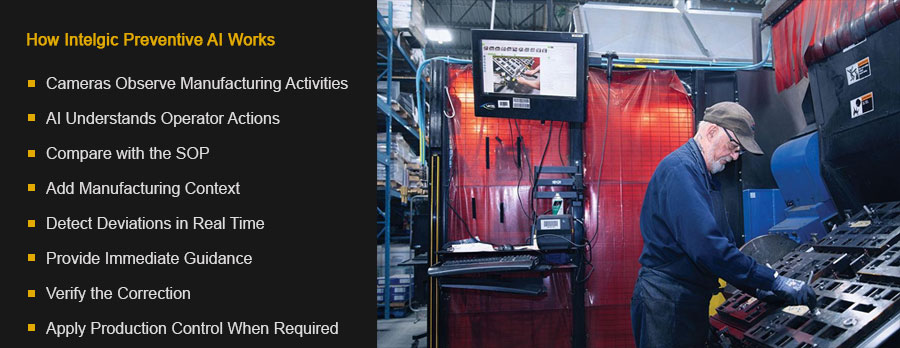
Industrial cameras are positioned around the workstation to capture relevant activities. Depending on the process, the system can observe:
The system may use area-scan cameras, high-resolution cameras, multiple synchronized cameras, 3D cameras, depth sensors, machine-integrated cameras, robot-mounted cameras, and specialized lighting.
Camera placement is designed around the defined process events, not general-purpose surveillance.
Intelgic's AI analyzes the camera stream and converts observable activities into structured process events. For example:
The system understands which step is active and which steps have been completed.
The AI compares actual execution with the approved Standard Operating Procedure. It can verify:
The process definition can contain required, optional, conditional, and product-specific steps.
Intelgic can connect the AI Assistant with MES work orders, Bill of Materials, ERP or SAP data, product recipes, variant configurations, digital work instructions, quality-control plans, production schedules, tool controllers, and part master data.
This tells the AI what should be manufactured at that workstation. When the product variant changes, the system can load the correct process sequence, components, tools, and quality checks.
Each deviation can be assigned a configured severity and response.
Intelgic can provide guidance through workstation displays, visual instructions, audio alerts, projected guidance, tablets, stack lights, Andon systems, connected tools, and PLC-controlled signals.
The operator can correct the mistake before the product moves downstream.
The cameras continue observing after an alert. The AI can confirm that:
This creates a closed-loop prevention process.
For critical processes, Intelgic can communicate with the manufacturing PLC. The system may:
Control behavior is configured according to process risk, safety, and quality requirements.
Preventing Common Shop-Floor Errors
A required step can be missed when instructions are complex, the process is repetitive, or an interruption occurs. Intelgic's AI maintains awareness of the current process state. If the operator attempts to proceed without completing a required action, the system can alert the operator or prevent release.
Some operations must occur in a defined order. AI can compare the observed sequence with the approved workflow and identify premature or out-of-order actions.
Components may look nearly identical but belong to different models, variants, or sides. Intelgic can identify parts using shape, size, dimensions, color, hole pattern, slots, surface features, printed markings, OCR, barcode or QR code, and 3D geometry.
The detected component can be compared with the BOM, work order, or product recipe. If the component does not match, the operator receives an alert before installation.
The correct part may still be installed in the wrong direction. The system can verify:
Visual guidance can show the correct position.
Nuts, bolts, screws, clips, washers, and other fasteners are common sources of assembly errors. Intelgic can monitor fastener picking, required count, installation sequence, visible fastener presence, fastener location, clip or washer presence, and completion of the fastening action.
For torque-critical operations, the visual result can be combined with data from connected fastening tools. The tool confirms torque or angle, while the camera confirms the correct location and visible assembly state.
The AI can visually identify tools or receive tool information from connected devices. It can verify:
For manual or semi-automated drilling, the system can monitor part placement, fixture usage, drill or tool selection, drilling-point sequence, number of drilling operations, and completion of required locations.
Calibrated machine vision or 3D sensing can be added when the resulting hole position or dimension must be inspected.
Intelgic can verify packaging operations such as:
The required contents can be loaded automatically from the work order or product recipe.
AI can monitor material movement across component bins, workstations, machines, conveyors, pallets, racks, rework areas, and dispatch stations. The system can identify:
Before a CNC machine, press, or assembly machine starts, the system can verify:
The result can be communicated to the PLC before cycle start.
Digital Work Instructions, Expert Knowledge, and Training
Static instructions are difficult to use during complex operations. Digital work instructions can present the information required for the current product and step. Effective instructions should:
Intelgic's AI Assistant can advance the instructions automatically when it recognizes that the current step is complete.
Experienced operators often know how to perform difficult steps efficiently and consistently. Intelgic can help capture this knowledge through a controlled process:
The fastest method should not automatically become the standard. The approved method must also satisfy safety, ergonomics, quality, and repeatability requirements.
The AI Assistant can provide contextual training while the operator performs the job. It can:
A new operator may begin with detailed step-by-step guidance. As consistent execution is demonstrated, the system can move toward assistance only when needed.
Analyze Difficult Steps, Cycle Time, and Root Cause
Intelgic can discover which process steps repeatedly cause difficulty. Indicators may include:
A difficult step may indicate a need for better work instructions, targeted training, improved component presentation, tool relocation, fixture redesign, process simplification, product-design review, or partial automation.
Cycle-time analysis must be connected with process compliance. The AI can measure total station cycle time, individual step duration, waiting time, repeated-step time, correction time, inspection time, and product-transfer time.
At the same time, it verifies whether all required work was completed. A shorter cycle is not treated as successful if the operator skipped a quality check, omitted a fastener, or used the wrong process sequence.
Camera-based AI can reveal operational information that may not appear in conventional production systems.
This data helps teams distinguish between individual mistakes and problems created by the process itself.
A useful error-prevention system does more than count mistakes. It helps determine why they occur. Intelgic analytics can connect deviations with process step, workstation, product variant, material batch, tool, shift, work-order change, training stage, cycle-time condition, material availability, and rework result.
For example, repeated wrong-part selections may be caused by similar components being stored next to each other. The appropriate solution may be to redesign the material presentation rather than provide repeated operator warnings.
Manufacturers can evaluate the error-prevention program using metrics such as:
The objective is to show whether process execution is becoming more consistent and whether errors are being corrected closer to their source.
Intelgic Certainty Platform and Factory Integration
Intelgic's Certainty platform manages the camera-based process-monitoring and Preventive AI workflow. Certainty can:
Certainty connects operators, cameras, manufacturing instructions, control systems, and enterprise data.
Intelgic can integrate its Preventive AI solution with:
The integration enables product-specific guidance, automatic recipe selection, process control, and end-to-end traceability.
Each production cycle can generate a structured record containing:
Selected images or video references can be stored according to the manufacturer's quality and data-governance policies.
Human Review and Responsible Use of Cameras and Operator Data
Not every situation should be resolved automatically. The system can request human review when:
Human decisions can be recorded and used to improve future system performance after appropriate review.
Camera-based AI should be implemented with clear governance and workforce transparency. Manufacturers should define:
The system should be used to improve processes, support operators, prevent errors, and identify training needs.
AI output should not be the sole basis for consequential employment decisions. Production conditions, material availability, product complexity, equipment performance, and workstation design must be considered.
Implementing Human-Error Prevention
A practical implementation can follow these steps:
Combine Prevention AI with Final Inspection
Preventive AI and final inspection perform different but complementary functions.
Together, they provide process assurance and product assurance.
Prevent Errors at Their Source with Intelgic
Human-error prevention begins by making the correct process clear, observable, and verifiable.
Intelgic deploys cameras and AI Assistants at manufacturing stations to understand operator actions, verify SOP execution, and provide guidance in real time. When the system detects a missing step, incorrect part, wrong orientation, tool error, packaging mistake, or other deviation, it helps the operator correct the problem before the product advances.
At the same time, Intelgic converts shop-floor activities into structured data. Manufacturers can identify difficult steps, recurring errors, training opportunities, process bottlenecks, and conditions that make mistakes more likely.
The result is a connected manufacturing process in which operators receive timely assistance, expert knowledge remains within the organization, and quality is built into every step.
Contact Intelgic to discuss AI-based human-error prevention, operator assistance, SOP monitoring, and manufacturing process analytics.